
Figma Variables Calculator Prototype (Config 2023)
October 2023

ROLE
UX & UI
TEAM
Sole Designer
TOOLS
Figma
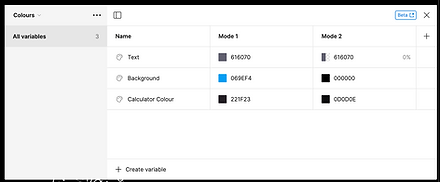
In June 2023, Figma introduced Variables at Config — a feature that lets designers create prototypes that behave more like real products. Instead of static click-through screens, you can simulate things like changing prices in a basket, toggling states, or tracking likes and counts.
To explore what Variables could really do, I built a fully interactive calculator prototype in Figma — one that handles basic arithmetic and behaves like a real calculator, including a working “memory” of the last operation.
It was a fun project, but it was also a practical one: I wanted to understand the boundaries of the tool and prove that you can prototype complex interactions without writing code.
What I Built
A calculator prototype that supports:
-
Multi-digit number entry (without overwriting previous input)
- + / – / × / ÷ operations
-
Correct operation order as users expect from a basic calculator flow (e.g. 10 + 10 - 50 behaves predictably)
-
A clean reset / “off” state
-
Button press states for tactile feedback
-
A few playful extras (theme colour selector + an Easter egg)


How the Logic Works (in plain English)
Number entry (multi-digit input)
Each time a number button is pressed, the prototype:
-
Shifts the current input left (multiply by 10)
-
Adds the newly pressed digit
This means pressing 2, 0, 0 becomes 200 — just like a physical calculator.
I also added a small guardrail: if the current input is 0 and the user presses 0 again, nothing happens. That prevents the “00000” problem.
Operations and memory
To make the calculator feel real, I created a simple memory system using Variables:
-
The current input is stored separately from the display value
-
The last operation (e.g. + or –) is stored in memory
-
When the user presses a new operator, the calculator first completes the previous operation, then stores the new one
So if a user enters:
10 + 10 - 50
…it first resolves 10 + 10 = 20, then applies - 50 → -30, instead of doing something odd just because the user changed operators mid-flow.
After an operation is applied, the input resets to 0 so the user can type the next number cleanly.
UI Details (the stuff that makes it feel polished)
Even though it’s “just” a prototype, I treated it like a real interaction:
-
Each button has a pressed/depressed state so users get immediate feedback
-
The display has a true “off” mode (numbers become transparent and reset)
-
A translucent overlay and background change reinforce state change
-
Turning it back on includes a small welcome-back Easter egg (because why not)
I also leaned into the aesthetic — inspired by Dieter Rams and the Braun ET66 — because great interaction design is even better when it’s paired with great visual character.
Why This Project Matters
This wasn’t about making a calculator for the sake of it. It was a quick way to demonstrate:
-
Systems thinking — modelling logic, state, and edge cases
-
Interaction design craft — making something feel responsive and intuitive
-
Tool fluency — pushing Figma Variables beyond simple toggles
-
Technical empathy — translating logic into constraints a product can support
It’s the same mindset I bring to product work: understand the system, simplify the user experience, and build something that holds up under real usage.
If I Revisited It
Next time, I’d likely create a clean “app-style” calculator variant alongside the retro physical version — same logic, different visual approach — to show how the interaction system can be reskinned across brands.